
Atmel SAM L21 Xplained Pro
Support for the Atmel SAM L21 Xplained Pro board.
Support for the Atmel SAM L21 Xplained Pro board.
Overview
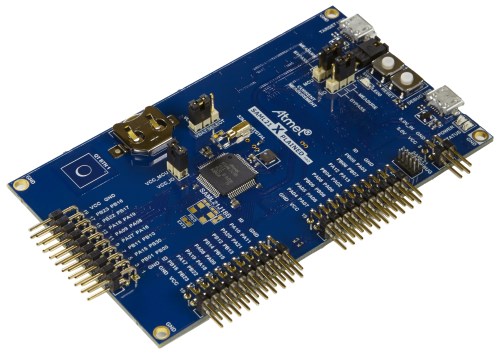
The SAML21 Xplained Pro is an ultra-low power evaluation board by Atmel
featuring a ATSAML21J18A SoC. The SoC includes a SAML21 ARM Cortex-M0+ micro-
controller. For programming the MCU comes with 32Kb of RAM and 256Kb of flash
memory.
Note: ATMEL’s most recent SAML21s are the B variant, or ATSAML21J18B.
Because the driver changes are mostly small, throughout this
reference the device will continue to be referred to as the ATSAML21J18[A/B]
indiscriminately.
Hardware
MCU
| MCU | ATSAML21J18A |
|---|---|
| Family | ARM Cortex-M0+ |
| Vendor | Atmel |
| RAM | 32Kb |
| Flash | 256Kb |
| Frequency | up to 48MHz |
| FPU | no |
| Timers | 8 (16-bit) |
| ADCs | 1x 12-bit (20 channels) |
| UARTs | max 6 (shared with SPI and I2C) |
| SPIs | max 6 (see UART) |
| I2Cs | max 6 (see UART) |
| Vcc | 1.8V - 3.6V |
| Datasheet | Datasheet |
| Board Manual | Board Manual |
User Interface
1 User button and 1 LED:
| Device | PIN |
|---|---|
| LED0 | PB10 |
| SW0 (button) | PA02 |
Implementation Status
| Device | ID | Supported | Comments |
|---|---|---|---|
| MCU | saml21 | yes | |
| Low-level driver | GPIO | yes | |
| PWM | yes | ||
| UART | yes | ||
| I2C | yes | ||
| SPI | yes | ||
| USB | yes | ||
| RTT | yes | ||
| RTC | yes | ||
| RNG | yes | ||
| Timer | yes | ||
| ADC | yes | ||
| DAC | yes |
Flashing the device
Connect the device to your Micro-USB cable using the port labeled as EDBG.
The standard method for flashing RIOT to the saml21-xpro is using edbg. by calling:
make BOARD=saml21-xpro -C tests/leds flashNote that on Linux, you will need libudev-dev package to be installed.
Users can also use openOCD to flash and/or debug the board using:
PROGRAMMER=openocd make BOARD=saml21-xpro -C tests/leds flashOn Linux you will have to add a udev rule for hidraw, like
echo 'KERNEL=="hidraw*", SUBSYSTEM=="hidraw", MODE="0664", GROUP="plugdev"' \ | sudo tee -a /etc/udev/rules.d/99-usb.rulessudo service udev restartArch Linux
With yaourt:
yaourt -S libudev0yaourt -S hidapi-gityaourt -S openocd-git# edit PKGBUILD, add "cmsis-dap hidapi-libusb" to "_features"Ubuntu
Although this refers to setting up the SAMR21, this guide is still very helpful to understanding how to set up a solid RIOT development environment for the SAML21: http://watr.li/samr21-dev-setup-ubuntu.html