
Olimex MSP430-H1611
Support for the Olimex MSP430-H1611 board
Support for the Olimex MSP430-H1611 board

MCU
| MCU | TI MSP430F1611 |
|---|---|
| Family | MSP430 |
| Vendor | Texas Instruments |
| Package | 64 QFN |
| RAM | 10 KiB |
| Flash | 48 KiB |
| Frequency | 8 MHz |
| FPU | no |
| Timers | 2 (2x 16bit) |
| ADCs | 1x 8 channel 12-bit |
| UARTs | 2 |
| SPIs | 2 |
| I2Cs | 1 |
| Vcc | 2.0V - 3.6V |
| Datasheet MCU | Datasheet |
| User Guide MCU | User Guide |
| Datasheet Board | MSP430-H1611 Datasheet |
| Website | MSP430-H1611 Website |
Schematics
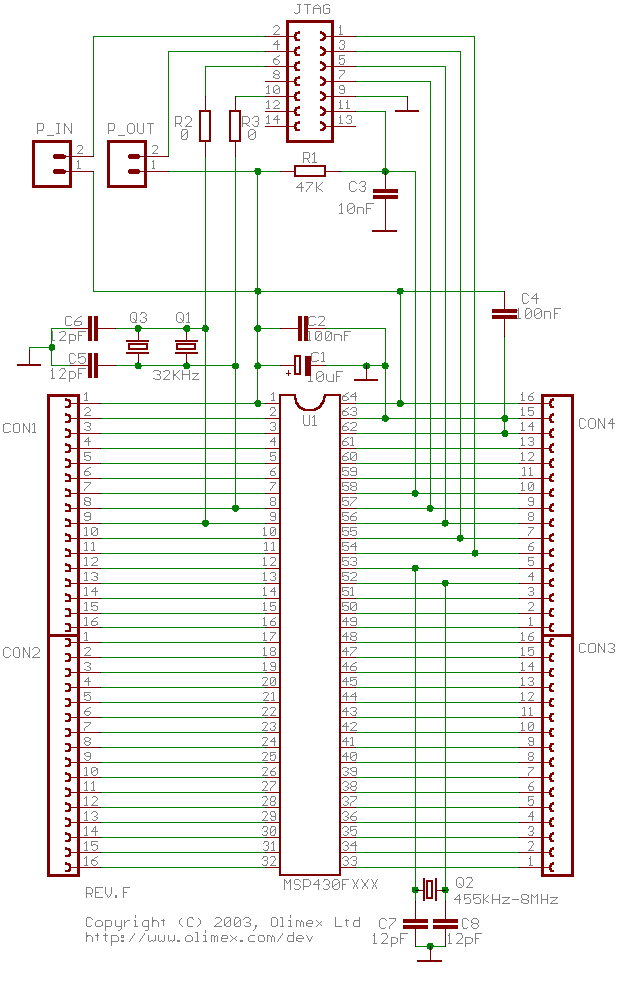
Pinout
The 64 pins on the edges of the PCB are connected to the corresponding MCU pins. Hence, the following pinout of the naked MSP430-F1611 MCU chip matches the pinout of the header board:

Flashing RIOT

Connect the board to a JTAG debugger supported by mspdebug; by default the Olimex MSP430-JTAG-Tiny (as shown in the picture above) is assumed, which is among the less expensive options.
Note: If you are not using the Olimex MSP430-JTAG-Tiny (or a compatible
programmer), set MSPDEBUG_PROGRAMMER to the correct value via
an environment variable or as parameter to make. E.g. use
make BOARD=olimex-msp430-h1611 MSPDEBUG_PROGRAMMER=bus-pirate to
flash using the bus pirate.
Warning: You can power the board via the JTAG programmer by placing a
jumper at P_IN. However, the JTAG programmer will only be able
to provide a limited current. You may want to disconnect the
header board from devices consuming a lot of power prior to
flashing.
Warning: If the board is powered externally, make sure to place the jumper
in P_OUT position, not in P_IN position.
Warning: A jumper in P_OUT is mutually exclusive to a jumper in P_IN.
Never connect both at the same time.
Note: Pin 1 on the JTAG connector has a small white triangle next to it and square pad, compared to the round pad used by all other JTAG pins.
Once the jumper is correctly placed in either P_IN or in P_OUT and the
JTAG cable is connected just run
BOARD=olimex-msp430-h1611 make flashUsing the shell
stdio is available via the UART interface with TXD = P3.6
(pin 35 on the header) and RXD = P3.7 (pin 34 on the header) at 9,600 Baud.
The easiest way is to connect an USB TTL adapter (such as the cheap cp210x
or ch341 based adapters) as follows:
TTL adapter    Olimex MSP430-H1611-----------    -------------------
       GND --- 63 (DV_SS)       TXD --- 35 (P3.7)       RXD --- 34 (P3.6)