
CC2538DK
Support for the Texas Instruments CC2538DK board.
Support for the Texas Instruments CC2538DK board.
Overview
The CC2538DK is Texas Instruments’ developer kit for the CC2538 SoC MCU, which combines an ARM Cortex-M3 microcontroller with an IEEE802.15.4 radio.
Hardware
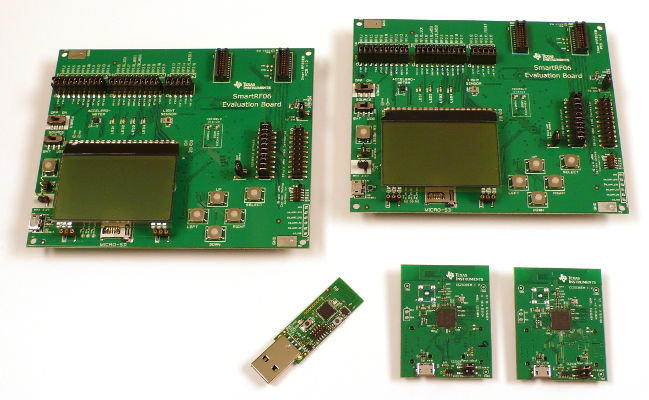
| MCU | CC2538SF53 |
|---|---|
| Family | ARM Cortex-M3 |
| Vendor | Texas Instruments |
| RAM | 32KiB |
| Flash | 512KiB |
| Frequency | 32MHz |
| FPU | no |
| Timers | 4 |
| ADCs | 1x 12-bit (8 channels) |
| UARTs | 2 |
| SPIs | 2 |
| I2Cs | 1 |
| Vcc | 2V - 3.6V |
| Datasheet | Datasheet (pdf file) |
| Reference Manual | Reference Manual |
Flashing and Debugging
By default, RIOT will attempt to flash the MCU via the USB UART using a Python script named cc2538-bsl. Hold down the SELECT pushbutton while pressing RESET to activate the MCU’s internal bootloader, then run:
BOARD=cc2538dk make flashActivating this bootloader is NOT enabled if the flash content is in factory default state (e.g. after unboxing). To set the bits in the CCA accordingly you have to follow the guidelines found here. To manage this first time access you have to download the “Uniflash” tool at TI’s website.
Some Linux machines may not recognize the CC2538DK’s vendor and product ID automatically. If a /dev/ttyUSBx device does not appear, try specifying these codes to the FTDI driver manually:
echo 0403 a6d1 > /sys/bus/usb-serial/drivers/ftdi_sio/new_id
If the path /sys/bus/usb-serial/drivers/ftdi_sio/ doesn’t exist, you also
have to load the module ftdi_sio by hand. Alternatively, you can install a
udev rule that configures this on device connection, see this post on TI’s
E2E site
for details.
RIOT will use /dev/ttyUSB1 by default, but if the UART is given a different device name, you can specity it to RIOT using the PORT variable:
BOARD=cc2538dk PORT=/dev/ttyUSB2 make flashTo flash using a Segger JLink JTAG adapter you need to install Segger’s
JLinkExe tool, then specify PROGRAMMER=jlink when flashing:
BOARD=cc2538dk PROGRAMMER=jlink make flash