
TI CC1350 LaunchPad XL
Texas Instruments SimpleLink(TM) CC1350 Wireless MCU LaunchPad(TM) Kit
Texas Instruments SimpleLink(TM) CC1350 Wireless MCU LaunchPad(TM) Kit
Overview
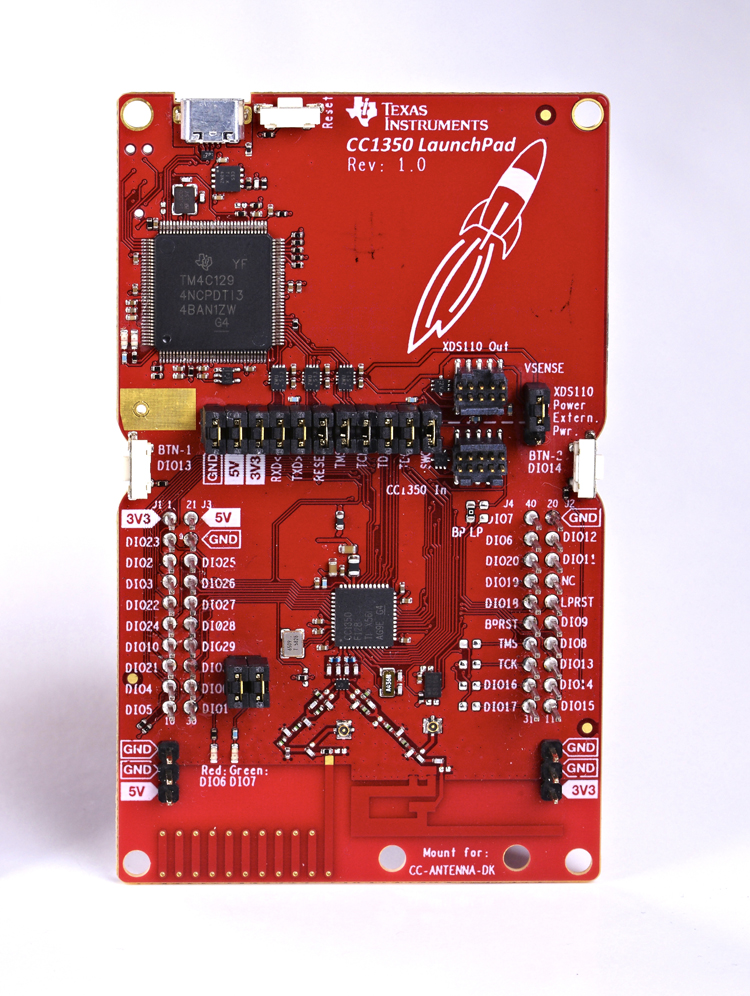
The LAUNCHXL-CC1350 is a Texas Instrument’s development kit for the CC1350 SoC MCU which combines a Cortex-M3 microcontroller alonside a dedicated Cortex-M0 to control a dual-band radio.
Hardware
| MCU | CC1350 |
|---|---|
| Family | ARM Cortex-M3 |
| Vendor | Texas Instruments |
| RAM | 20KiB |
| Flash | 128KiB |
| Frequency | 48MHz |
| FPU | no |
| Timers | 4 |
| ADCs | 1x 12-bit (channels) |
| UARTs | 1 |
| SPIs | 2 |
| I2Cs | 1 |
| Vcc | 1.8V - 3.8V |
| Datasheet | Datasheet |
| Reference Manual | Reference Manual |
Board pinout
The CC1350 Quick Start Guide provides the default pinout for the board.
Flashing the Device
Flashing RIOT is quite straight forward. The board comes with an XDS110 on-board debug probe that provides programming, flashing and debugging capabilities through the USB Micro-USB connector. Once either TI Uniflash or OpenOCD are installed just connect the board using the Micro-USB port to your computer and type:
BOARD=cc1350-launchpad make flashTo use OpenOCD instead of uniflash we need to set the PROGRAMMER environment
variable, this is to enable OpenOCD instead of Uniflash.
PROGRAMMER=openocd BOARD=cc1350-launchpad make flashAccessing RIOT shell
Default RIOT shell access utilize XDS110 debug probe integrated with launchpad board. It provides virtual serials via USB interface - for connecting to RIOT shell, use the first one (with TI drivers for Windows named “Class Application/User UART”).
If a physical connection to UART is needed, disconnect jumpers RXD and TXD joining cc1350 microcontroller with XDS110 and connect UART to pin RXD/DIO2
The default baud rate is 115 200 - in both connection types.
Warning: Launchpad cc1350 board is not 5V tolerant. Use voltage divider or logic level shifter when connecting to 5V UART.
More information
For detailed information about CC1350 MCUs as well as configuring, compiling RIOT and installation of flashing tools for CC1350 boards, see cc26xx_cc13xx_riot.